Read local logs
Supports Claude Code, Codex, Antigravity and custom JSONL. Ollama shows running models.
AI usage · Desktop utility · TokenPulse
See token usage, cache hits and recorded quotas from your menu bar or system tray.
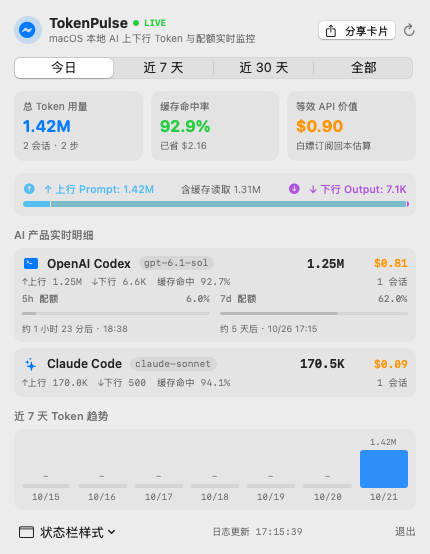
A CLOSER LOOK
A lightweight window into everyday AI coding. Read local logs, explore daily and longer-term usage, and see quota reset times supplied by those logs.
Supports Claude Code, Codex, Antigravity and custom JSONL. Ollama shows running models.
Explore input, output, caching, trends and estimated cost. Undated usage does not trigger live alerts.
Shows recorded quotas and reset times, with an explicit pending state after expiry.
Lives in the Mac menu bar or Windows tray and continues running when the panel closes.
MADE FOR YOUR DESKTOP
macOS · Apple Silicon
Windows · x64
Preview builds. The Mac app is ad-hoc signed and not notarized; the Windows package is not publisher-signed. Check system requirements and the checksums on each release. Windows mixed-DPI and tray interactions still need physical desktop validation.
Checksums, release notes and all versions ↗